

Follow one practice stake#
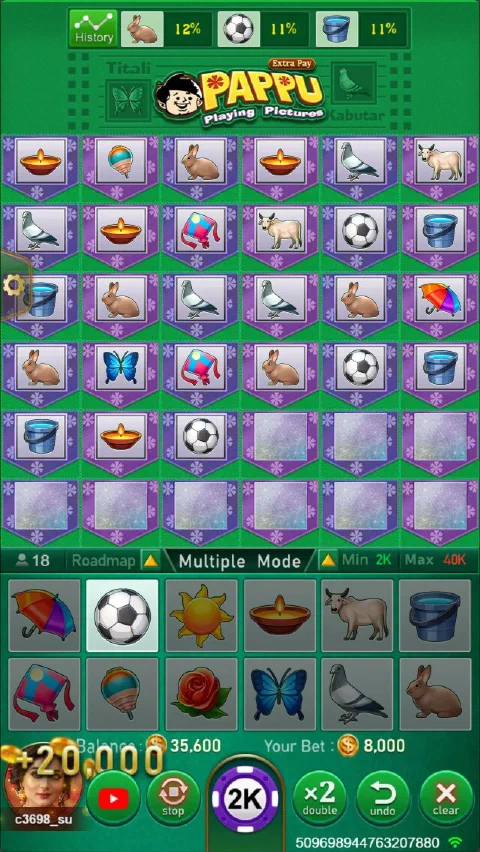
Choose a picture you would recognise if it appeared on its own. The butterfly makes a good first example because you can find it between the rose and the pigeon in the lower row. On the board illustration, point to the butterfly and imagine putting one practice unit there. Keep your finger or pointer away from the partner button. You can follow the entire example on the image. You might put a fingertip below the chosen tile as a temporary marker. Leave it there while you look up towards the result so that your choice is easy to find again.
Write “one on butterfly” before inventing a result. That little note fixes your choice while all twelve options are still in front of you. If you wait until after you name a result, it is remarkably easy to remember only that you chose something with wings. In an actual round a butterfly and a pigeon are two distinct choices. The board settles the one drawing that matches.
A practice unit on the butterfly#
If you are in a working publisher trial, read the balance label before following along. Make sure you can identify the session as practice and see the amount you are about to use. Locate the choice on the strip, read the amount attached to it and then look towards the result. The poster here lets you rehearse those movements without submitting a selection.
Now cover the lower strip with a piece of paper and say what would have to appear above it for your practice unit to match. Uncover the strip and check your note. If you can find the same drawing again without starting at the first tile, you are ready to read a complete example. A walkthrough of how to play Pappu follows the same round into the settlement.
Read the result#
Read the choice and the result in order. In an imaginary first reveal, let the result window show the pigeon. The practice unit still sits on the butterfly. The pigeon can be the winning pattern for the round while your particular choice misses. That sentence accounts for both what the board revealed and what happened to the stake you chose. If you jot down the stake in a narrow margin, use a separate space for the result. Otherwise a neatly written pigeon might later look like a second selection.
Imagine starting fresh with the same one-unit choice for a second example. This time put a butterfly in the reveal window. You have a match. For the picture exercise, write “butterfly, matched”. To explain a returned amount in a working trial, use that round’s own multiplier and settlement display. A result copied from a still illustration supplies neither the terms nor the balance of your session.
Compare the first and second sample reveals#
Now give the two sample reveals separate lines on your paper. Put a small mark by the selected picture only if you are including Extra Pay in that example. Extra Pay may randomly raise the multiplier on the marked picture. A mark on the butterfly would matter to a butterfly match. It cannot make the pigeon in the first example count as a butterfly.
For a more exact comparison, leave the stake unchanged and vary just the presence of the feature on the matching picture. This lets you see which observation you would need to explain a different return. You would still have one choice and one revealed picture in each case. To check a round result later, keep the selection, the reveal and any marking together under that round.
Walk through one imaginary selection#
Take a closer look at the two winged drawings. The butterfly has a pair of wings spread around its body. On the neighbouring tile the pigeon is recognisable as a bird. Use the rose to locate the butterfly from the other direction. Reading the neighbours gives you another way to recover your place if you look up at the result area and then back at the strip. Someone who calls the pigeon a bird can still follow the exercise. Agree which tile the word refers to before naming any imaginary result.
Try describing the first imaginary result to someone who cannot see the board. “I backed the one with wings and something with wings came up” leaves the outcome undecided. “I picked the butterfly and saw the pigeon” settles it immediately. If you play through the same exercise with the pigeon as your choice, a butterfly reveal will be a miss in the opposite direction.
Trace the wings in both windows#
Next, keep a note of your choice and describe just the imagined reveal. Does the drawing have the butterfly’s paired wings or the outline of a bird? Compare shapes even if the result is drawn larger than the selection. Once you have identified it, return to the lower row and point to where that very image appears among the possible choices.
If a second person is helping, one of you can name the choice while the other names an imaginary reveal. Take turns keeping the two words in the right order. You can also run through a case where you put one practice unit on each of those two pictures. Either picture would then be covered at a total cost of two units. A single reveal still yields only one of the two drawings.
Check which control you are using#
Use the picture to locate each control before you open a live board. The Pappu board controls guide identifies Again, Double and Undo on JILI’s screen. On this poster those words are part of the image. You can point them out or read them at a larger size. Tapping the artwork is unnecessary for the exercise and will not put a practice unit on the strip. On a phone, scroll far enough to see the edge of the illustration. A separate button beneath it belongs to the page and can take you away from the drawing.
If you came here expecting a playable trial, identify what is open. The illustrated page has a heading and explanatory text around the board. A publisher launcher can instead show a loading screen before any choices become available. If the publisher’s opening graphic stays on screen, follow the steps for checking a stalled trial in the trial tab.
What opens after Play for real#
Play for real follows a sponsored route to the partner lobby. After taking it, first identify the service that opened. If you find a game listing, read the title and JILI studio credit. Then read the balance context on the page where you might make a selection. A paper exercise or practice balance leaves your cash balance untouched.
If your only aim was to see which winged picture matched, you can finish at the poster. For a real-money decision, start again with the amount and terms visible in the partner account. Being able to recognise the butterfly answers a question about the board. Knowing what you would commit from your account requires a separate check before you use any working game control.